

Blog
Solar Security Cameras Are the Fastest Growing Segment in the UK, and Still Only 7% of Sales

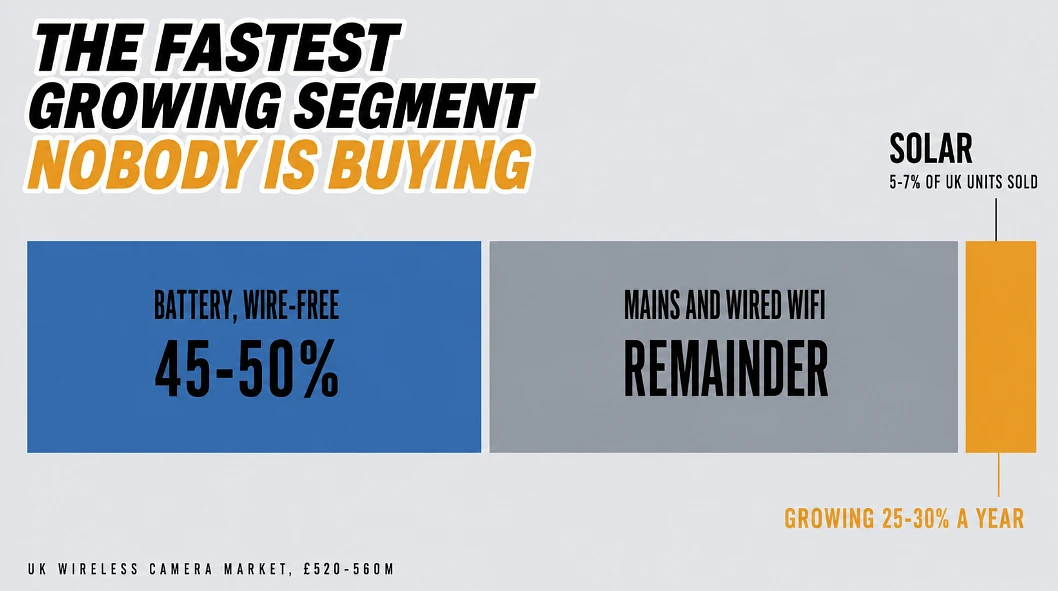
Start with two numbers, because together they tell you where this market genuinely sits right now. Solar powered outdoor cameras are growing at 25 to 30% a year in UK unit terms, and yet they still make up only about 5 to 7% of units sold. So growth is quick but from a small base, and most buyers are still weighing mains against battery without ever seriously looking at this third option.
Battery already settled its half of that argument, since wire free battery cameras overtook wired wifi camera for the first time in 2025 and now take roughly 45 to 50% of UK unit sales, mostly because installing one needs no electrician. Solar simply carries that same idea one step further by removing the recharging chore as well.
Around 35 to 40% of UK households now own a smart camera or video doorbell, in a wireless camera market worth £520 to £560 million this year.
Where Solar Earns Its Place, and Where It Does Not
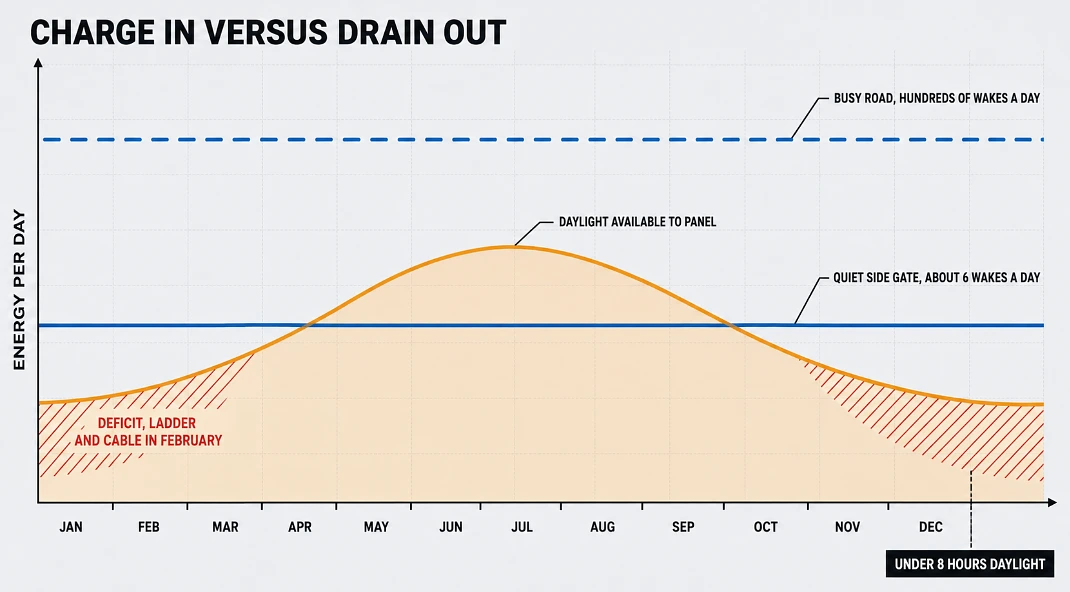
Line chart showing solar input falling below camera power draw between November and February
The honest use case is anywhere a cable is expensive or ugly. Detached garages, back gardens, side passages, gates, allotment sheds, holiday lets.
A solar camera converts daylight through its panel into a rechargeable battery, then records either continuously or on detection. The panel is not there to power the camera directly, it is there to top up faster than the camera drains.
That balance is where UK buyers get caught, and it deserves spelling out properly rather than being waved past. December in London gives under eight hours of daylight and most of it is overcast, further north it is less again, and a panel angled flat against a wall in permanent shade behind a hedge collects almost nothing regardless of what the box says. A camera facing a quiet side gate might wake six times a day and coast through winter without trouble. The same camera pointed at a road with buses, cyclists, foxes and a street tree that moves in the wind will wake hundreds of times, and each wake means radio, processing, possibly a spotlight and an upload. Add a household that checks the live feed several times an evening and you have a device consuming faster than a January sun can replace. So the sensible order of operations is to work out how much traffic the scene actually produces before choosing anything, then angle the panel for winter sun rather than summer, which usually means steeper than instinct suggests and often means mounting the panel separately from the camera. Detachable panels exist for exactly that reason. Anyone treating solar as unlimited free power will be out on a ladder with a cable in February.
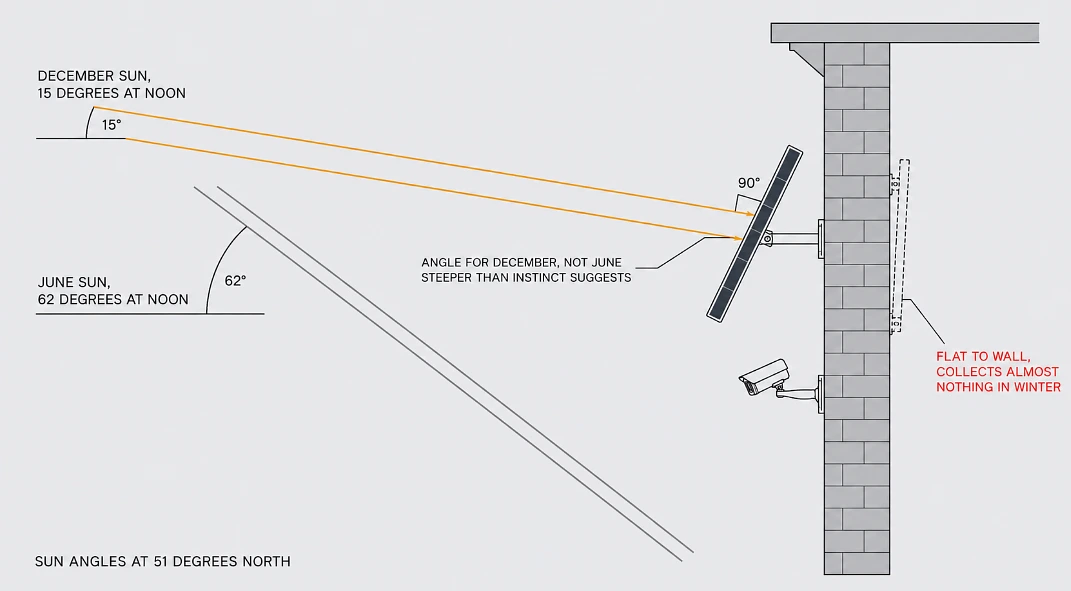
Side elevation diagram comparing December and June sun angles hitting a steeply tilted solar panel
Test the WiFi Where the Camera Will Actually Live
Not indoors. At the mounting point, outside, with the doors and windows shut as they normally would be.
Most wifi cameras connect on 2.4GHz because it travels further through masonry. That creates a specific and very common failure: if your router broadcasts both bands under one network name, the camera may refuse to pair at all. Splitting the bands temporarily during setup fixes it.
Things that kill an outdoor signal that look fine on paper:
Solid brick and stone, particularly Victorian external walls. Foil backed insulation, which behaves like a mirror to WiFi. Metal garage doors and steel framed sheds. Neighbouring networks crowding the channel in terraced streets.
Stand at the spot with the app open and watch live video for several minutes before drilling anything. If the connection cannot hold there, a WiFi extender is usually the wrong answer for an outbuilding, and a 4G model with its own SIM is the right one.
The Data Rules Changed in February 2026
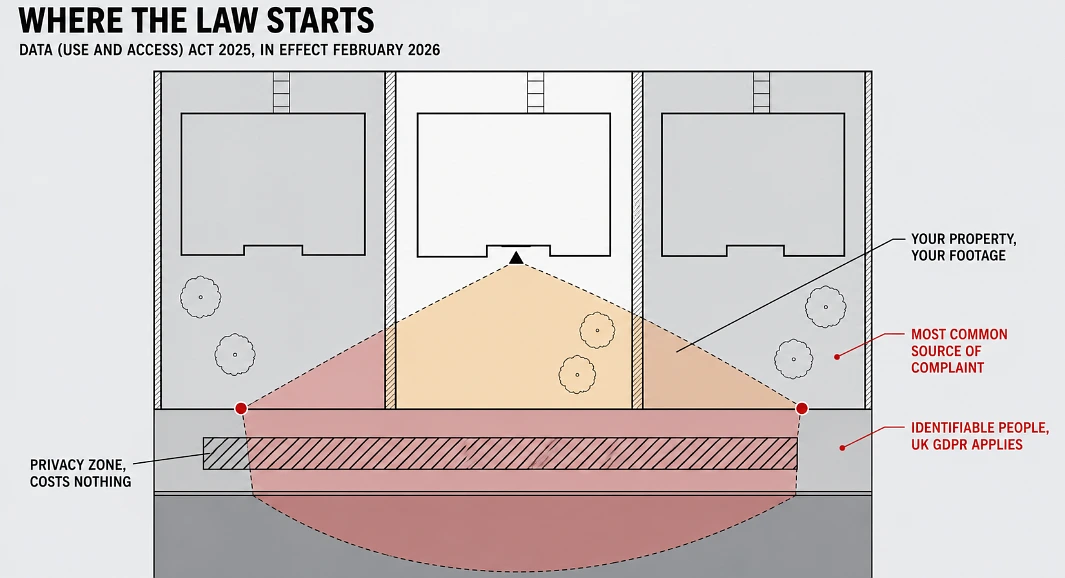
Site plan showing a camera’s view cone in amber inside the property and red where it crosses onto the pavement and neighbours’ gardens
Buying guides are still repeating each other’s old advice on this part, so here is the current position as of this year. In February 2026 the Data (Use and Access) Act 2025 came into effect, and the ICO has confirmed its CCTV and video surveillance guidance is under review because of it. Despite what some sites claim, no new standalone CCTV law replaced anything, but the framework did move, and one useful change is added clarity around legitimate interests as a lawful basis for running a security camera.
One rule stays exactly where it always was though, and it is the rule that catches people. Once your camera captures identifiable people beyond your own property, pavements, shared drives, a neighbour’s garden, you are processing personal data under UK GDPR and the Data Protection Act 2018, and a video doorbell gets treated by the ICO exactly like a conventional camera.
What that means for your own setup, in plain terms:
Privacy zones cost nothing, take minutes to draw in most apps, and remove the single most common cause of neighbour complaints, so mask the pavement and next door’s garden on day one rather than after a letter arrives. An ICO complaint can end with you being required to reposition or mask a camera anyway.
Keep footage around 30 days unless something specific gives you a reason to hold it longer, since that is where retention guidance sits.
Check whether audio recording came switched on out of the box, because plenty of cameras ship that way, and guidance says leave it off unless you have a specific need for it. Sound carries further than the lens sees.
Remember anyone your camera captures can make a subject access request for their footage, neighbour included.
Secure It Before You Rely on It
The NCSC publishes advice for connected cameras, and it is short enough to follow exactly as written: change the default password, install firmware updates, and turn off remote viewing whenever it is not needed. Your router deserves the same attention, because a camera sits inside your network boundary, so it is only ever as protected as whatever it connects through.
Budget for the Subscription, Not Just the Camera
The shop price is only half the bill, so run through the rest before paying it:
Cloud storage and AI alerts: typically £4 to £8 a month, now 25 to 30% of this market’s recurring revenue.
Three years of that subscription can cost more than the camera did.
microSD cameras skip the fee completely. One catch, a stolen camera takes its footage with it.
Decide which trade suits you before the free trial ends, not after.
Broadband providers now bundle cameras with packages, around 15 to 20% of new sign ups this year, so check your own provider before paying full retail.
Resolution Matters Less Than Framing
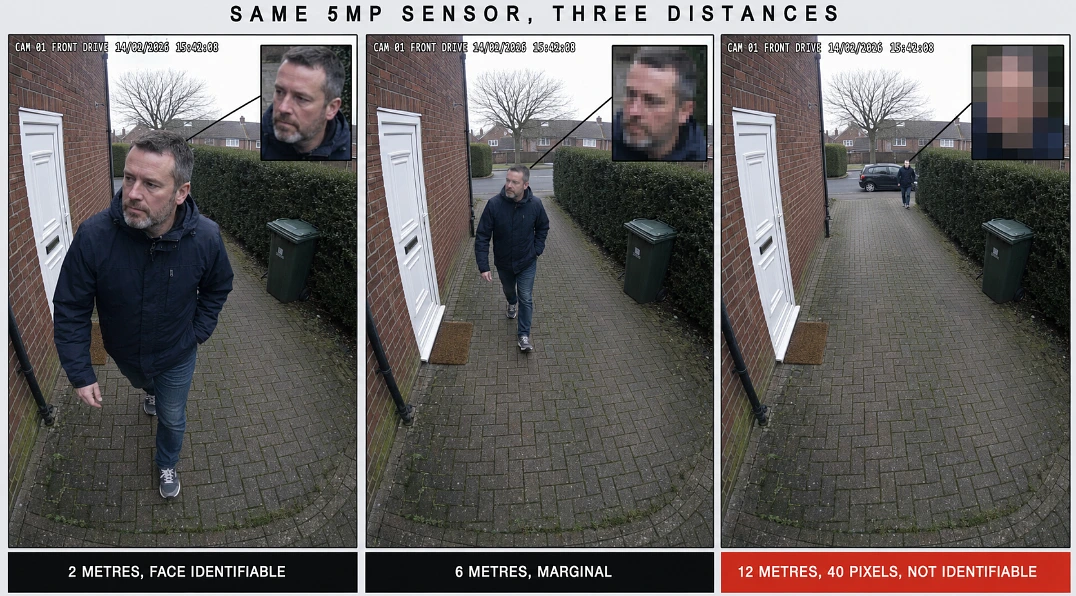
Three security camera frames of the same driveway at 2, 6 and 12 metres with pixelated face insets showing loss of detail
A 5MP sensor cannot recover a face that occupies forty pixels of the frame. So decide first what has to be identifiable, a face at the door or a number plate on the drive, set your field of view around that distance, and only then start comparing resolutions, because megapixels spent on the wrong framing are megapixels wasted.
The Order to Decide In
That order is the whole decision, and it is worth trusting over any spec sheet, since a camera whose panel gets real winter sun and whose signal holds at the mounting point will hand you more usable footage than a fancier model stuck in shade at the edge of the network. So walk the site before buying, work out what must be identifiable, and choose where footage will live. Those three checks prevent what most people end up doing anyway, which is taking the whole thing down and moving it a fortnight later.