

Blog
Why Your Home Office Probably Has The Wrong Chair & The Right Desk Lamp

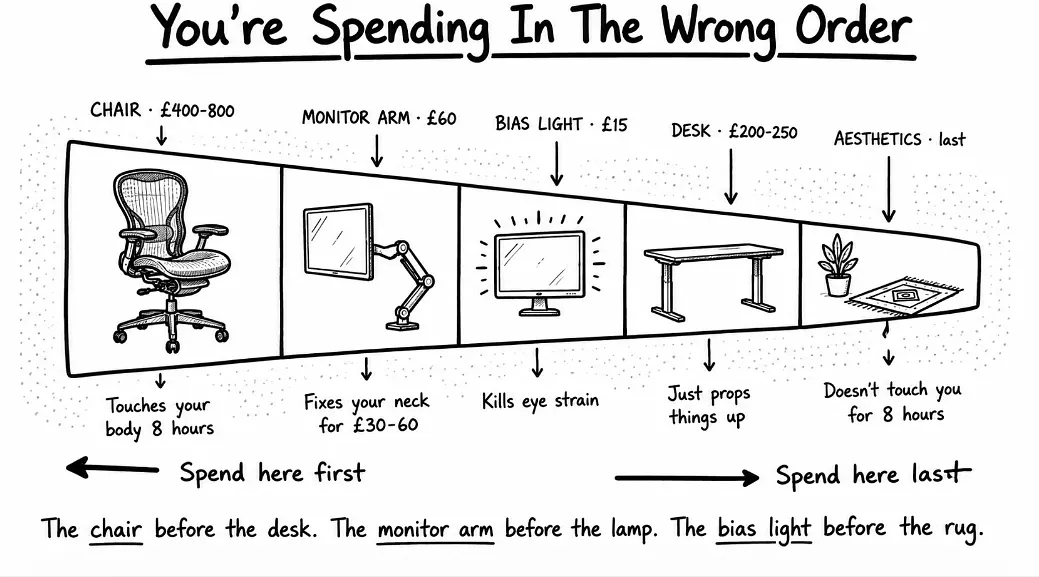
If you’ve created a workspace at home in the past few years, it’s likely you prioritised your spending wrong. Almost everyone does. We spend the money in the wrong order, on the wrong things, and after six months we ask ourselves why our shoulders have felt like carrying bricks since Tuesday.
So I’m going to do something different here. But before there’s any mention of plants or paint colours, let’s discuss the actual order of importance of what matters in a home office — because almost every guide you read has it backwards.
The Most Common Mistake In Spending Orders
A real-life first home office budget example:
- A lovely desk, £400.
- The nice-looking chair, £200.
- A nice desk lamp, £150.
- £80 on plants, rug, organisers.
- £15 on whatever it sat on at the beginning.
No monitor arm. Nothing on lighting that’s actually going to alleviate eye strain. Only the keyboard and mouse that came with the computer.
Six months later, that same person is now in pain in the neck by 3pm each day, can’t move the lower back properly when standing, and is considering buying a standing desk, or practicing yoga, or changing their career. The room looks great in pictures though.
The actual hierarchy resembles something upside down. The chair is in contact with your body all day. Your eyes are on the computer for hours each day. You’re on the computer all day long with your hands. The desk just props things up. For eight hours the rug doesn’t come in contact with you.
That’s the entire issue. Let’s now see what the research and the experience have to say about each layer.
The Reality Of Working From Home
You may be thinking that’s melodrama. It is not.
A 2024 study of more than a thousand computer workers revealed a direct correlation between increasing hours worked remotely and the development of new neck and upper back pain, and one of the strongest correlations was for workstation quality. There was an increasing trend for pain when working from home as opposed to office only. There were also greater risks for pain with greater amounts of remote working time and poorer workstation setups.
Earlier surveys during the pandemic shift depict an even sharper picture. 39% of remote workers said they were experiencing more lower back pain and almost 46% said they were experiencing more upper back or neck pain than when they were working in the office. One study showed neck pain in 60.3% of home computer users, lower back pain in 59.5% and shoulder pain in almost half of the sample.
It’s not that working from home is bad. It’s that most people have designed their home setup around looks rather than ergonomics. You most likely had a pretty good chair in the office you left, the monitor was at an appropriate height, and the desk fit you. At home, you’ve got a dining chair, a laptop on a coffee table, and a back that is beginning to ask itself what it has done to deserve all this.
The Largest Item Is The Chair And Most People Spend Too Little On It
This is what people don’t know about office chairs.
The £150 office chair you picked up from Argos or Amazon was likely designed to be used by one person for four to six hours a day, with standard office breaks included. On foot to the printer. Going to meetings. Away from the computer for lunch.
So now think about what you really do at home. Nine til six. No need for strolling to the other floor to access the coffee machine. No meeting rooms. Sitting down, standing up for tea, sitting down again. You’re sitting for an extended period in a chair that wasn’t designed for a workday.
This is where chairs designed to work in a continuous way come in. This category is in place because contact centres and control rooms required seating that would endure 24/7 shift work in a multi-user environment. The engineering at each level is different.
What A Chair Actually Does When It Is Used Continuously
- High-resilience foam that does not deform after four hours of sitting and does not permanently flatten after eighteen months.
- Coordinated tilt movement of seat and backrest that occurs as you lean, rather than your spine resisting the chair.
- Higher weight ratings, usually 130 to 150kg, as opposed to the average rating of 110kg.
- Longer warranties on the mechanism, typically five to ten years, because the manufacturer assumes the chair will last.
- Multi-shift testing certification, which is the actual technical standard for furniture that is used continuously.
These ergonomic office chairs for prolonged use are not hype. They are a genuine product category which have engineering differences. You need one if you’re sitting at your desk for six hours a day or more. The standard professional range will suffice if you’re at your desk for four hours a day.
The large office chairs category is the middle ground for those home workers that aren’t using the chair all day long, or don’t require a full continuous-use spec, but who still do need a high-quality chair.
The most frequent question I receive is what it costs. This is the straight scoop.
| Budget tier | What you actually get | Honest verdict |
|---|---|---|
| Under £200 | Decorative chairs, fabric over thin foam, basic tilt | Fine for occasional use, will fail at full-time work |
| £200 to £400 | Decent mesh chairs, proper lumbar, IKEA Markus and similar | Workable but the bare minimum for full-time home work |
| £400 to £800 | Real ergonomic engineering, synchronous tilt, multi-adjust | The sweet spot for most full-time home workers |
| £800 to £1,500 | Continuous-use category, multi-shift rated, full warranty | Worth it if you sit eight hours a day every day |
| £1,500+ | Aeron, Steelcase Gesture, Embody | Excellent but diminishing returns past this point |
Most people should be striving to be in the £400 to £800 bracket. That’s where the engineering becomes relevant. Below it you’re purchasing decoration that has a chair-like shape. Above that, it’s mostly the brand and finishing you’re paying for.
The £30 Thing That Changes More Than A £300 Chair Upgrade
This is the part nobody tells you, and I can’t get my head around it.
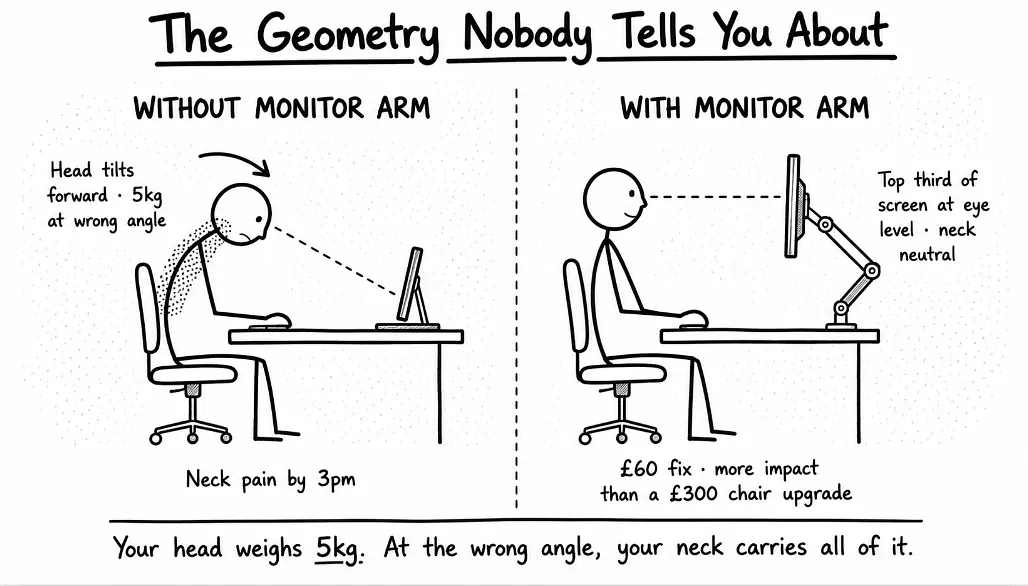
The second most important ergonomic upgrade after your chair is a monitor arm. These range in price from £30 to £80 and are reasonably priced. They’ll work better for your neck than any chair adjustment ever could.
Why? Geometry. Pure geometry.
If your monitor is on its own stand and rests on your desk, the top of the screen sits at about chin height. Your eyes tend to look about a third of the way down the screen, so you’re looking almost downward the entire day. Your head bends forward. Your neck carries the weight of your skull at the wrong angle.
The weight of your head is approximately 5kg. With your head level, that weight is practically weightless on your shoulders. When you lean forward, your head automatically tilts back, extending the neck and compressing the discs between the cervical vertebrae, which tightens the muscles in the neck, upper shoulders and between or beneath the shoulder blades to bear its weight.
A monitor arm moves the screen into the optimal viewing position, so the top third of the screen is at eye level, the eyes rest naturally, and the neck remains neutral. That is it. The whole fix.
The research supports this with solid evidence. The centre of the monitor should be about 17-18 degrees below horizontal for best viewing, which can only be accomplished by raising the screen. Most laptops on stands and most built-in monitor stands sit too low. With a lower monitor, you tilt your head down to look at the screen. Holding this position for hours puts a strain on the muscles in the neck and upper back. This ongoing tension can cause chronic neck pain, stiffness and even headaches.
Fair Prices On Monitor Arms
- £30 to £40 — Vivo single arm, does the job but looks a bit basic.
- £60 to £90 — Ergotron LX or NB North Bayou, the sweet spot, well engineered.
- £150+ — Herman Miller Flo, Humanscale M2, too much for most setups.
If I had to choose between giving someone an extra £300 for a better chair or £60 for a monitor arm, I’d pick the arm. The chair upgrade makes a difference. The monitor position is more important. It’s not something almost anyone gets told.
The Most Common Mistake Guides Make About Lighting
Open any home office article, and you’ll read the same tips: place your desk near a window, buy a stylish desk lamp for task lighting, soft warm bulbs create a calm atmosphere.
This isn’t actually false. It just lacks the real-world lighting issue most home workers are facing.
This Is Truly What Is Behind The Headaches
The single biggest cause of eye strain in a home office is not the absence of natural light. It’s the brightness contrast between your screen and the wall behind it. You’re looking at a glowing display in a darker room, and your pupils are continually adjusting between the bright source and the dark surface around it. After six hours of this, your eyes ache.
The repair is approximately £15. This is known as bias lighting.
A thin strip of LEDs attached to the back of your monitor, projecting gentle light onto the wall behind. That’s the whole device. Bias lighting provides a stable, low-level ambient light behind the screen that keeps your pupil in a more neutral state. According to research on pupillary response, continuous rather than intermittent light decreases fatigue.
The science is well established. When eyes have a constant luminance to adapt to, they don’t need to work as hard to adjust to contrast differences. This means smoother visual comfort and more vivid perceived contrast on screen. The colour temperature is important too. Most professional monitors are calibrated to a white point of 6500K. If the bias light is too warm or too cool, the brain perceives a colour cast on the screen and compensates by increasing the effort of the eyes to correct the white balance.
So purchase a 6500K bias light strip. £15 from Amazon. Attach it to the back of the monitor. Your eyes will no longer hurt after a week.
How About The Desk Lamp
Yes, get a good one, but not an expensive one that costs £200. A £40 task lamp fitted with an appropriate bulb does the same job. The fancy ones are aesthetic changes, not functional ones. The lamp is not as important as the bias light, and almost no guide mentions the bias light.
The Pinterest Aesthetic: The Downside When It Works Against You
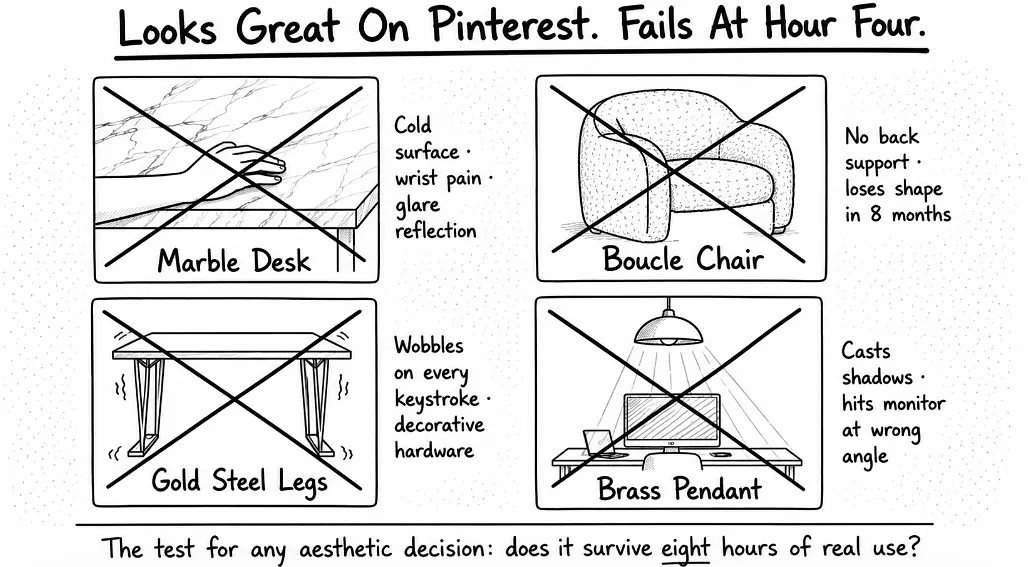
I have to be careful here, because I don’t want to come across as not being a fan of nice-looking rooms at all. A home office should look good. But there’s a certain type of aesthetic that does well on Instagram and Pinterest yet really fails as a workspace, and that’s something worth naming.
- Marble desks. Photograph beautifully. Cold to the touch, your wrists hurt after an hour on the surface, and the glossy finish reflects every overhead light directly into your screen. Glare for days.
- Boucle chairs. Soft, sculptural, very Instagram. The fabric loses its shape under sustained weight within eight months. No proper back support, so you slump within an hour. Created to be sat in for the length of a coffee, not a day of work.
- Gold-finished steel desk legs. Wobble. The joining hardware on most decorative legs is dressed for appearance rather than hardened to take load. You’ll feel the wobble on every keystroke with any force.
- Hanging brass pendant directly over the desk. Ambient mood lighting, not task lighting. Casts shadows across the work surface, hits your monitor at the wrong angle, and is usually positioned for the photograph rather than the function.
None of this means you have to work in a beige cube. The most attractive office I’ve ever seen in person belonged to a graphic designer with a plain ash plywood desk she built herself, a black mesh chair that cost about £800, a single monitor on an arm, and a wall of books behind her. It looked incredible. But it also worked, because every choice was based on how she actually used the space.
The test for any aesthetic decision in a workspace is whether it survives eight hours of real use. Not whether it photographs well at golden hour.
The Things Worth Splurging On And The Things That Aren’t
Let me put it this way.
Worth the money:
- Chair, £400 to £800 range at minimum if you work full-time at home.
- Monitor arm, £60 to £90 sweet spot.
- Mechanical keyboard if you type for a living, £100 to £150.
- Decent webcam if you do video calls daily, £80 to £150.
- Bias lighting, £15.
Not cost-effective:
- Desks over £400 unless you specifically need sit-stand.
- Desk lamps above £80.
- Anything called “minimalist” at four times the price of the IKEA version.
- Boucle anything in a workspace.
- Most Muji organisers, since the cheaper unbranded versions are identical.
The exception on desks is when you genuinely need a height adjustment. Either you’re taller than about 6 foot, or shorter than about 5 foot 4, or you have a specific posture issue where alternating sit and stand matters. In those situations, an electric sit-stand desk earns its £350 to £700 price tag. If you’re an average-height person, a fixed-height desk at £200 will do and will look fine.
The Setup Most People Should Actually Build
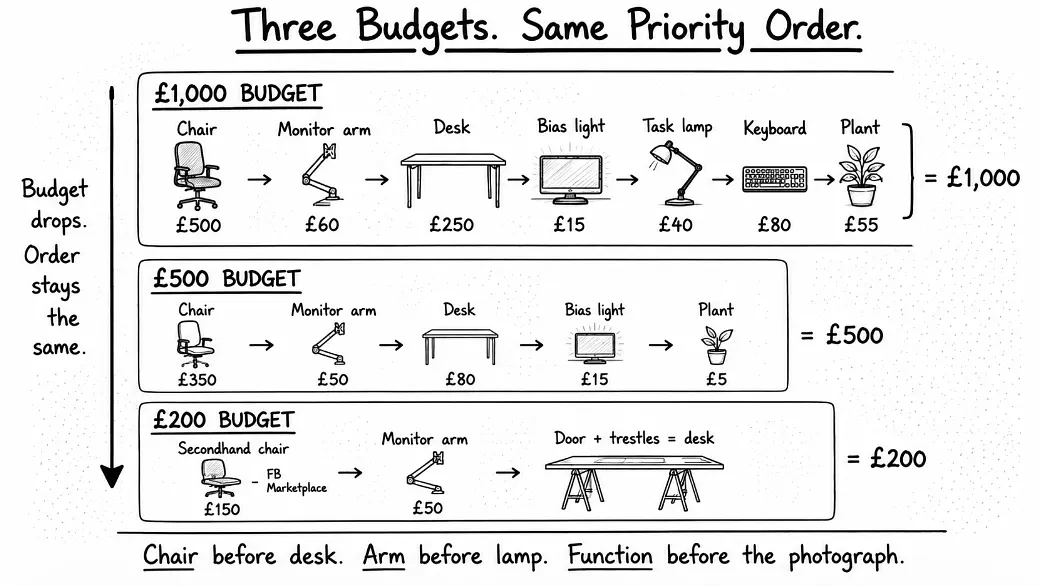
If you’re starting fresh with £1,000, here’s the spend that will actually serve you:
| Item | Budget | Why |
|---|---|---|
| Chair | £500 | The single most important purchase |
| Monitor arm | £60 | Changes the ergonomics of everything |
| Desk | £250 | Fixed-height in solid wood or veneer |
| Bias lighting | £15 | Eye strain killer |
| Task lamp | £40 | Functional, not fancy |
| Keyboard upgrade | £80 | If you type a lot |
| Remaining | £55 | Plant, frame, one nice mug |
Total: about a thousand. Each item is well-deserving of its place.
If you have £500 instead, drop the keyboard upgrade and the task lamp. Pay £350 for the chair, £50 for the monitor arm, £80 for the cheapest desk of an appropriate height, £15 for bias lighting and £5 for a houseplant. Aesthetics can wait.
With £200 available, buy the best secondhand chair you can find on Facebook Marketplace or Gumtree. Used Herman Millers and Steelcase Leaps, ranging from £200 to £300, come up from office liquidators constantly. The desk can be a flat door on two trestles for now. Add a £50 monitor arm. Skip everything else.
It’s the order that’s the point. The chair before the desk. The monitor arm before the lamp. The bias light before the rug. Function before the photograph.
What You Really Need To Remember
Three things, really.
- The chair is what your body will be concerned with in six months. Underspend here and you’ll live to regret it. Spend at the £400 to £800 floor minimum for full-time work, and consider the continuous-use category if you’re working eight-hour days every day.
- The monitor needs to be at eye level, not desk level. A £60 arm will affect your day more than a £300 chair upgrade ever would.
- The aesthetic comes last, not first. Beautiful rooms are wonderful. Rooms that look great but ruin your back in six months are simply costly mistakes with good lighting.
Design the workspace around how it will be used. The picture will appear as soon as the function is right. The reverse is rarely effective, and most people discover this the hard way.